
How to write in vote for Willa Concannon
Whether you vote on a touchscreen or on a paper ballot, choose the Write-in option in the Court of Appeals race and enter WILLA CONCANNON.
On a touchscreen
What the voting machine screen looks like at the polls. Screens may vary slightly by county.
Matthew Byrne has dropped out of the race, but his name is still on the ballot.
- 1
Find the race
Page through the ballot to "For Judge of the Court of Appeals (12th District)." Matthew Byrne's name is still on the ballot even though he has dropped out of the race.
- 2
Touch Write-In
Touch the Write-In choice below Matthew Byrne's name. A keyboard page opens.
- 3
Type her name
Type WILLA CONCANNON on the on-screen keyboard. Use SPACE between the names.
- 4
Touch Accept
Touch Accept. The Write-In line now shows WILLA CONCANNON with a check mark.
- 5
Review and print
On the review screen, confirm WILLA CONCANNON is shown for the Court of Appeals race, then print your ballot.
On a paper ballot
For mail-in ballots, and paper ballots requested at the polls. Ballots may vary slightly by county.
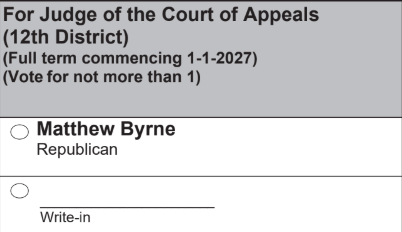
Matthew Byrne has dropped out of the race, but his name is still printed on the ballot.
- 1
Find the race
Find "For Judge of the Court of Appeals (12th District)." Matthew Byrne's name is still printed on the ballot even though he has dropped out of the race.
- 2
Fill in the Write-in oval
Completely fill in the oval next to the blank Write-in line. Leave the oval for Matthew Byrne empty.
- 3
Print her name
Print WILLA CONCANNON clearly on the Write-in line.